


Kallune: Coding an OpenGL Game from Scratch
What does it look like to code a game without an engine? Last year, as part of an OpenGL course, my friends and I had to create a game from the ground up.
It was incredibly interesting, both from a coding perspective and in terms of teamwork. Together, we debated the architecture quite a bit. And once our project was well-planned, we spent a memorable night programming the game and fixing mysterious bugs.
In this article, I’ll look back at the trade-offs we had to make, the issues we encountered, and what we think about it in hindsight.
But first, a little demo!
The assignment was to create a game inspired by Digger, where you break blocks and get chased by enemies. We decided to add an isometric presentation (in fake 3D) because it’s cool.
Separation of concerns
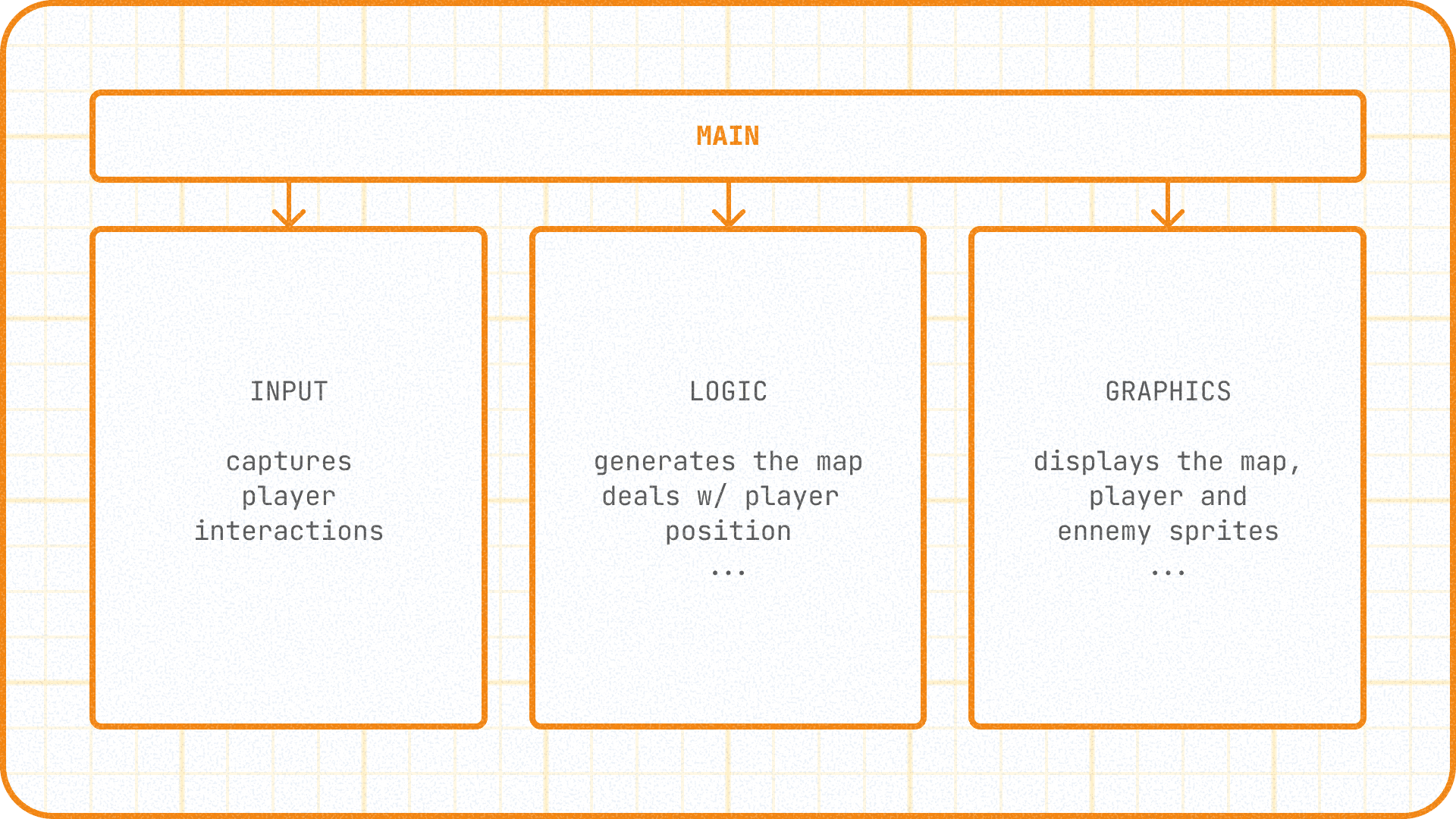
Let's dive straight into the deep end: the separation of concerns. This was our main topic of discussion at the start: how do you properly organize a game?
Actually, there are several schools of thought. We decided to separate logic (what's actually happening, like "the badger got eaten by a wolf") and display (what we see, a nice animation of a badger being eaten by a wolf) as much as possible. We can summarize this approach with a simple motto: if we ever want to turn the game into full 3D, we won't need to touch the game logic. By the way, this proved to be entirely true when I started porting Kallune to the Nintendo DS (I talk about that in another article).
Secondly, we also decided to separate the input block, which handles user controls. Imagine if we wanted to add controller support; it would be a huge pain to have to modify the game logic. As they say, stick to what you know and everyone's happy.
And all of this fits quite simply into the game loop:
- The input block checks the current state of inputs (which keys the player pressed, where the mouse is, did they click, etc.). It passes this state to the logic block.
- The logic block processes these inputs and calculates the next state of the game logic (did the player move, were the flowers eaten, did wolves appear, etc.). It passes this state to the graphics block.
- The graphics block displays what corresponds to that logic (the current state of the map, the position of the wolves, the player's score, etc.).
In practice, this separation also has a few drawbacks (I'll put the details in the dropdown if you're interested)
- Separating logic and display adds a risk of desynchronization between the two: when an enemy doesn't show up, for example, you have to check if the issue comes from the state transfer between the two.
- For some purely graphical features (for instance, adding random decorative tiles on the map that aren't planned by the logic), the separation of concerns adds work and complexity. You have to instantiate objects in the display block to have a "persistent" random that doesn't recalculate every frame. It's not necessarily bad, but it can take time. We later thought of other techniques to avoid this issue (deterministic Perlin noise, for example).
- The library we use for window management (GLFW) isn't really suited for separating display from interaction management. It uses a Window object that combines both aspects. The callbacks you can pass to it to retrieve user interactions must be static functions, which forces the use of global variables—something we wanted to avoid. We managed to bypass this problem, but it slightly messed up the clean separation we had imagined.
« All your change of basis are belong to us »
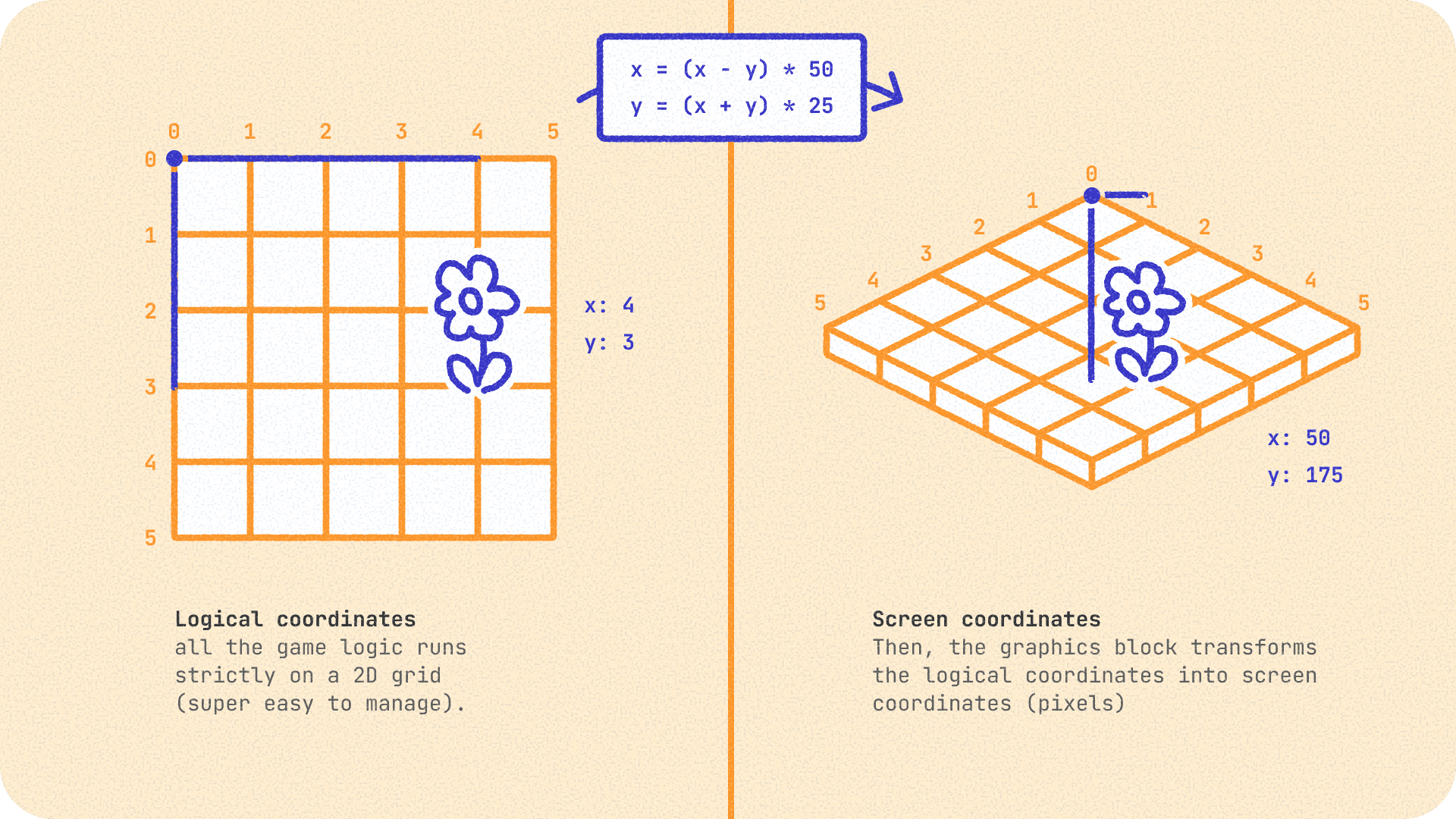
As mentioned earlier, we decided to use isometric graphics for Kallune.
However, at the game logic level (where we handle collisions, character movement, etc.), we decided to stick with classic coordinates on a 2D grid. It’s only at the moment of displaying visuals that we transform "2D grid" positions into isometric positions. "But why bother with two coordinate systems?" you might ask. Well, in reality, it's much simpler this way:
- It is much easier to handle collisions with grid coordinates (for example, for the right edge of the map, we just check if player.x < mapSize).
- Our logic block remains completely detached from the display block. The day we switch to another display (3D with a free camera, for example), we can just use our grid coordinates. They are completely decoupled from the visuals.
But then, how do you go from grid coordinates to isometric coordinates?
Don't panic, but it's actually pure linear algebra. It’s nothing more than a change of basis, just like in a math class on vector spaces.
We apply a transformation via a mathematical formula to the (X, Y) coordinates of the logical grid to get the rendering coordinates (x_iso, y_iso) on the screen.
In a very simplified way, the formula for drawing tiles in isometric view (with a 2:1 ratio) looks like this:
float x_iso = (X - Y) * (tile_width / 2.0f);
float y_iso = (X + Y) * (tile_height / 2.0f);
The beauty of this separation is its flexibility. If we decided tomorrow to switch to an entirely different type of display (like a free 3D camera), we would only need to define a new projection matrix—essentially a new change of basis!
Another crucial point is the drawing order of elements. For the illusion to work, we display objects back-to-front (farthest first, then closest, commonly known as the painter's algorithm). Thus, the front tiles naturally mask the back tiles. This is what gives the effect of depth and fake 3D in isometry.
Roads? Where we're going, we don't need roads
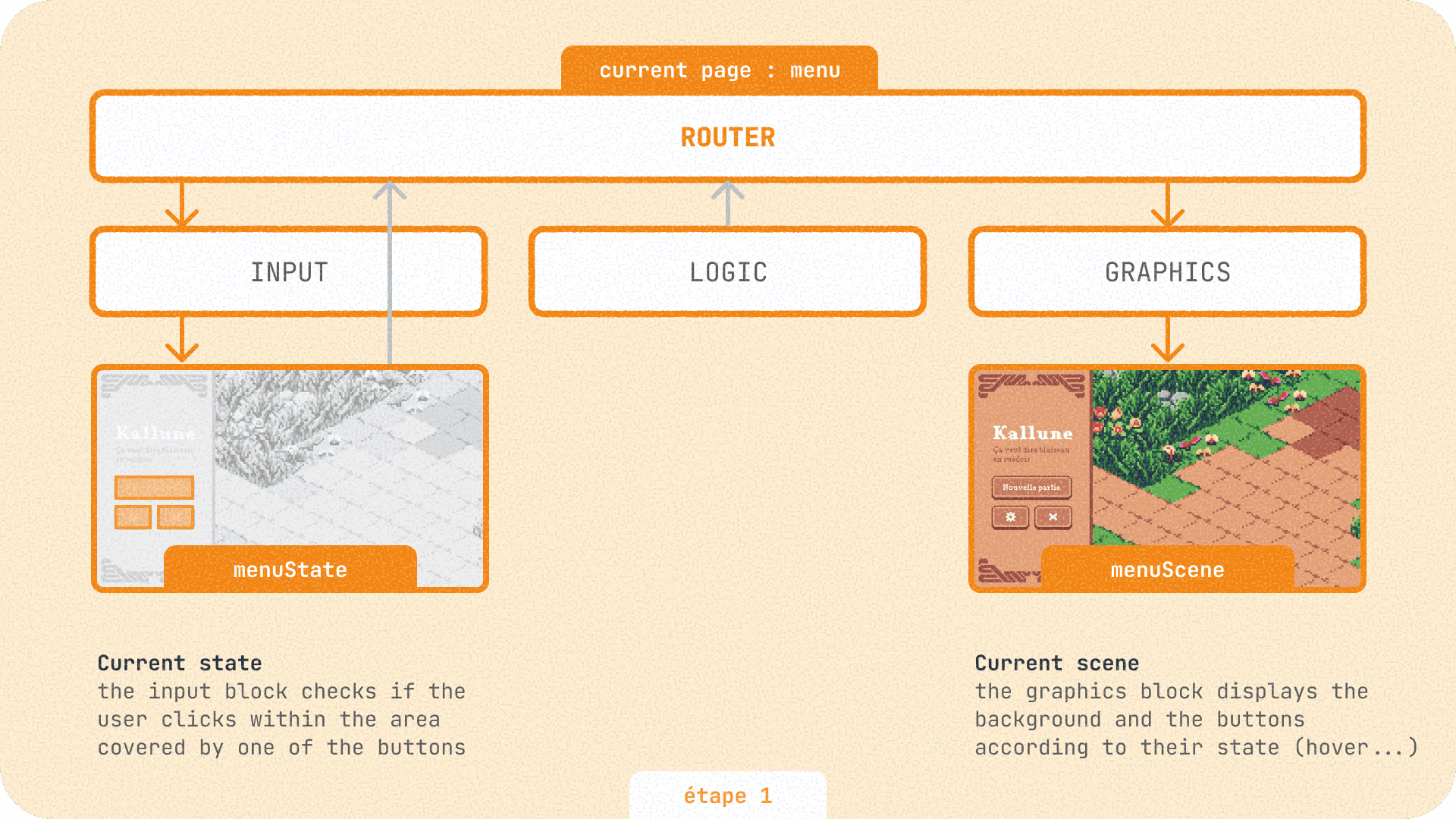
Since we don't have an engine, we don't have a ready-made "scene" system. So we cooked up a home-made router, in line with our input / logic / graphics separation. This router allows us to navigate between different pages (main menu, game, etc.).
And its code is so short that I'm putting it here in its entirety:
// scene.hpp
enum Scene {
  Menu, Settings, Playing, Paused, End
};

// router.hpp
struct Router {
  Scene currentScene {Scene::Menu}; // we start at the menu
  void goTo(Scene scene);
};

// router.cpp
void Router::goTo(Scene scene) {
  currentScene = scene;
}
The key takeaway is that our router dictates which page is displayed. It gives this value to each of the three blocks (input, logic, graphics). These blocks then load the corresponding logic. If you want more precision, the diagram above ↑ explains all this in detail.
When in doubt, reboot
I’ll skip the details of our OpenGL integration, but you can find all the project source code on GitHub. I’d rather focus on the few bugs we encountered that are worth the detour.
First off, we discovered the hard way that OpenGL textures have a maximum width by default.
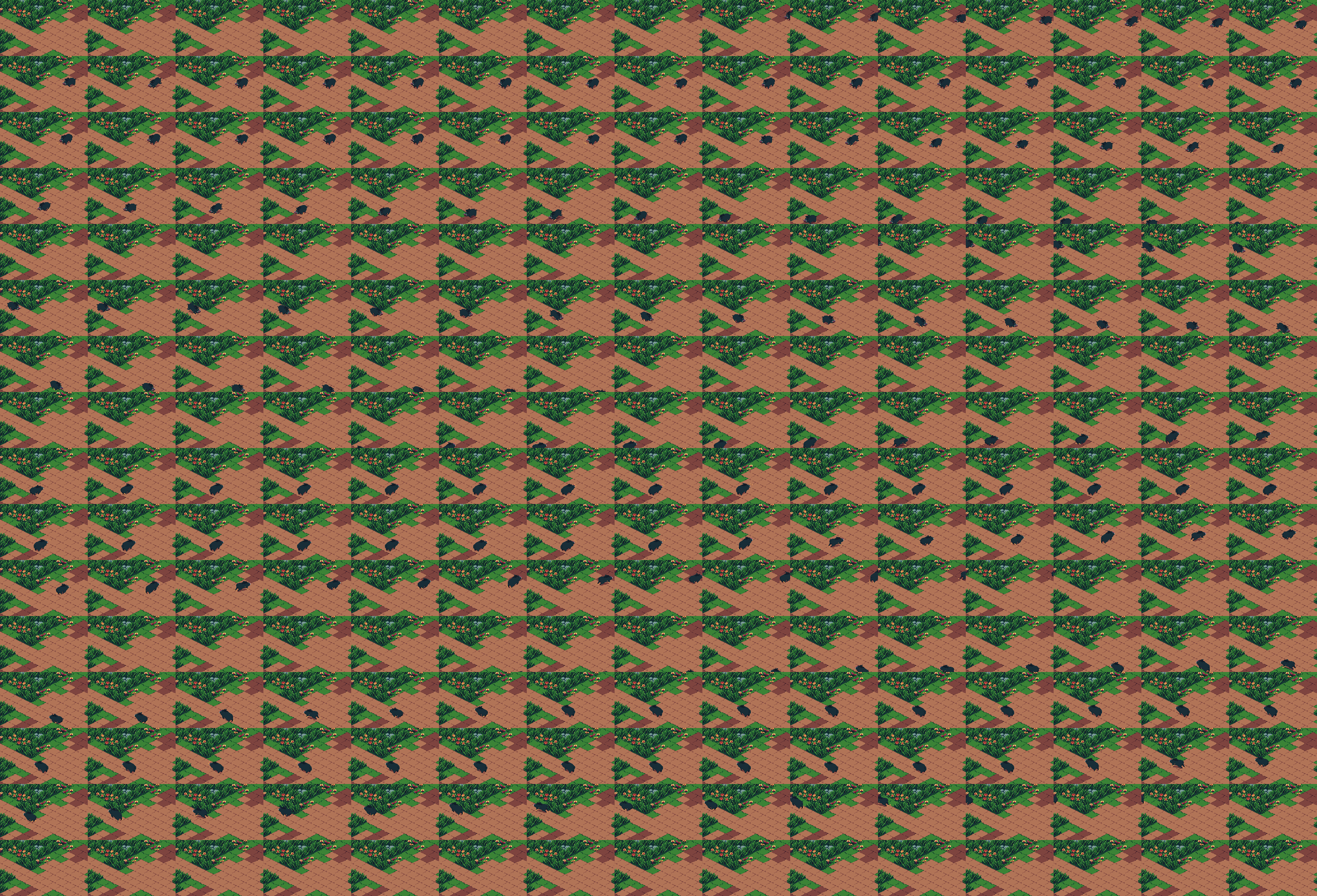
Remember the animation on the title screen? To save time, we used a spritesheet. To make a long story short, we had to split it into multiple lines (a square spritesheet rather than one long strip) while lowering its resolution so that every frame remains pixel perfect.
The final spritesheet is 2775x1888 pixels, which is much more reasonable than the original (even if it's not the most optimized, we can agree on that).
Next, OpenGL on Mac. For some context, Apple decided to deprecate OpenGL on its machines in 2018 (8 years ago—yes, already) in favor of Metal, its home-grown graphics API. And even back then, Apple hadn't updated its OpenGL implementation for 8 years. For Kallune, we were dragging along a version that was 16 years old. The move to ARM didn't help: windows resize poorly, transparent textures don't work exactly the same as on Windows—in short, a whole bunch of minor differences. Few people talk about these specific issues, but this blog helped me a lot. Fortunately, we weren't doing anything too extravagant with OpenGL, so it went relatively well.
Later, we also had this rather scary popup.
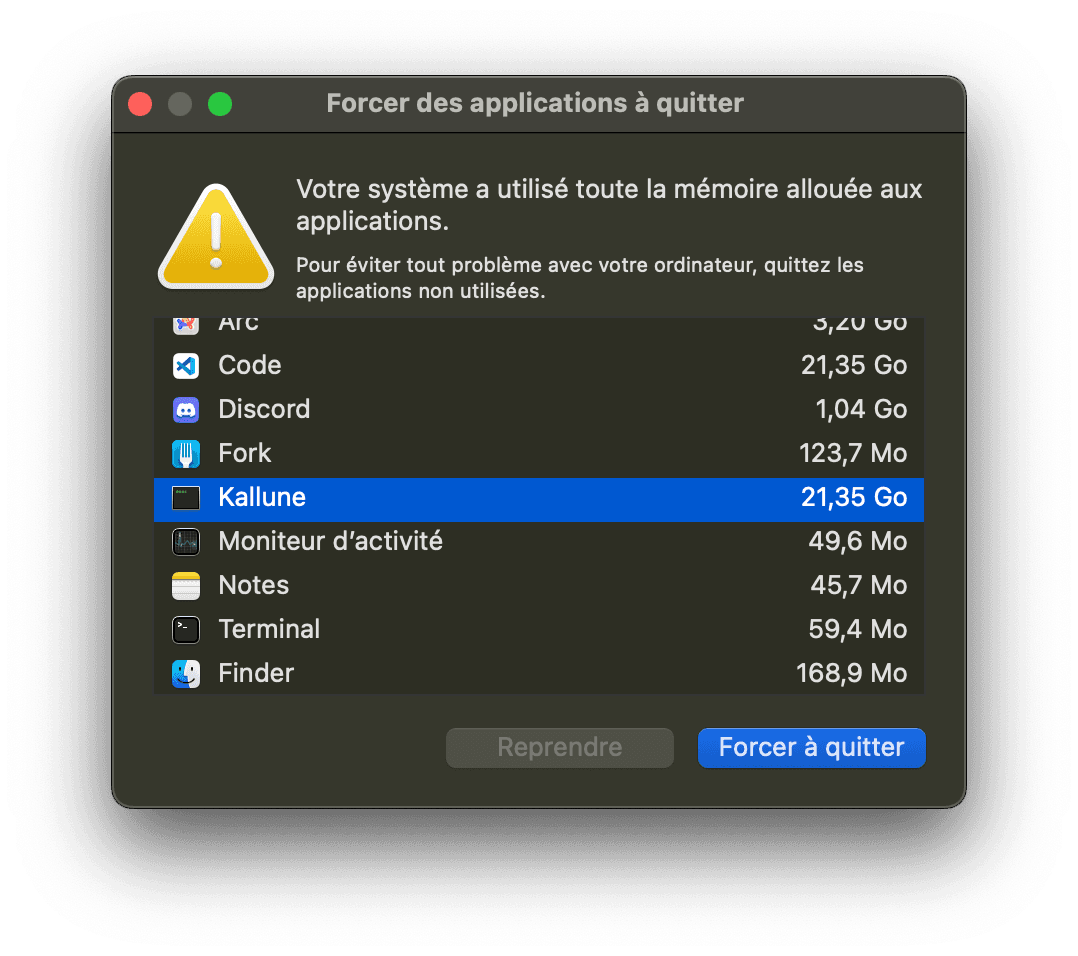
The issue came from loading animated sprites. At every step of the animation, we were creating a new UV array and recreating VAOs. Multiplied by the number of animated sprites, 60 times per second, we were looking at one hell of a memory leak.
We extended our graphics library with a function that updates only the UV buffer, which solved the problem.
To be continued...
Well, that's the end of this already veeeery long article.
I could have also talked about map generation using cellular algorithms, but that's for another time.
I loved doing this project; it was very educational! And I have great memories of it, especially a memorable all-nighter spent polishing the game before the deadline. I’d like to take this opportunity to thank Quentin (@BQuent1) and Guillaume (@guillaume-tritsch) with whom we successfully completed this project!
What, you want even more?
If you're curious to learn more about how I struggled to get Kallune running on a Nintendo DS, I'll let you click here 🙂↕️