


656KB of VRAM: How I Ported My Game to the Nintendo DS
Remember Kallune, that isometric 2D game I mentioned in another article? It can't be that hard to port to the Nintendo DS, right?
Well, yes, the opportunity seemed perfect.
The DS runs C++, and Kallune is entirely written in C++.
It has low-resolution screens, and the game is pixel art.
It's not very powerful, and the game isn't very demanding.
Everything seemed perfect in the best of all possible worlds.
But what was supposed to be a weekend project ended up taking much longer. Admittedly, the Nintendo DS is an ingenious little machine, but it’s also incredibly stubborn. Juggling all its limitations isn't easy, but with a bit of persistence, you eventually start loving the hunt for every single microsecond of optimization.
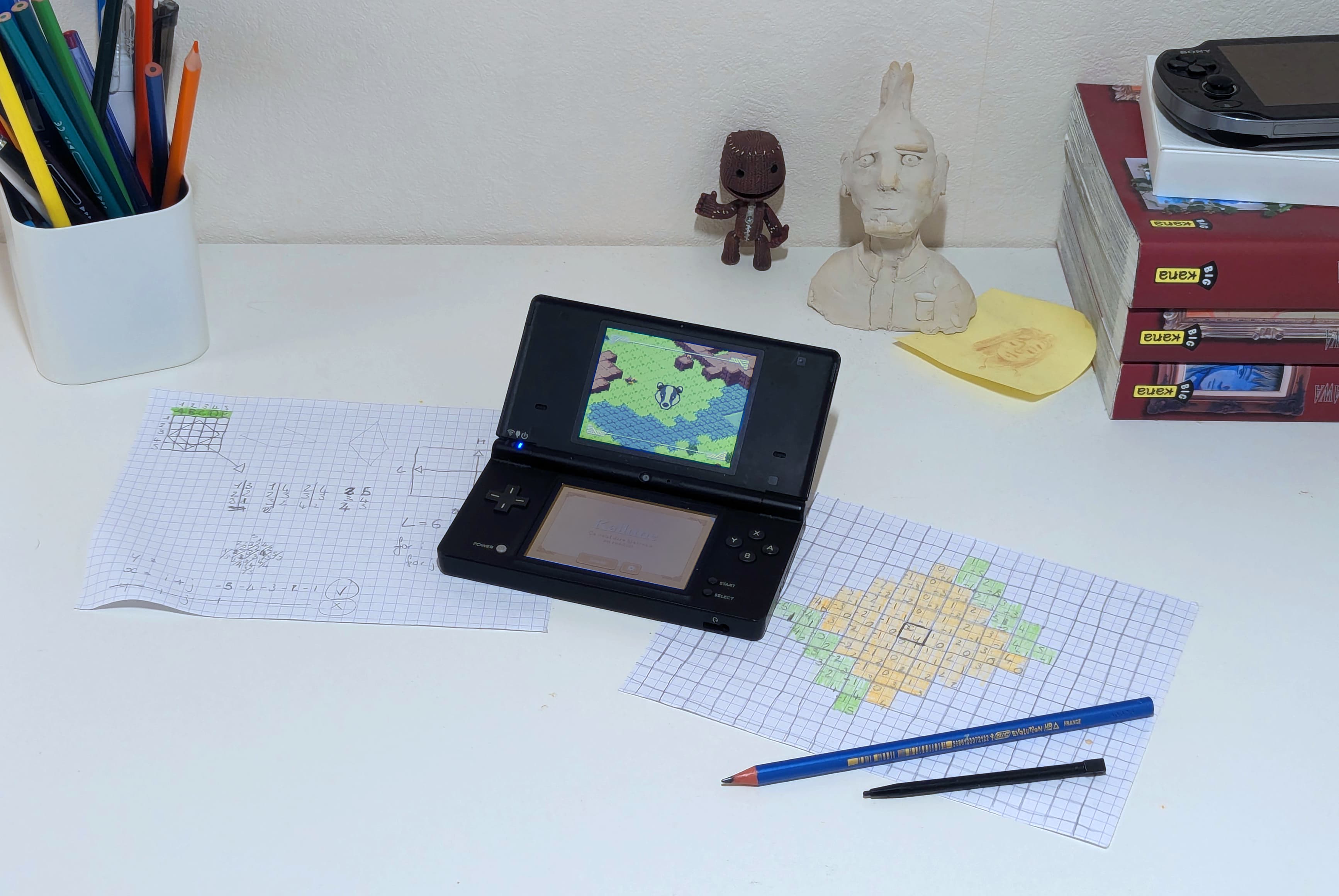
That's exactly what happened to me, as I'll tell you in this article.
Without a second thought, I dug up my old DSi and got to work.
It's Alive!
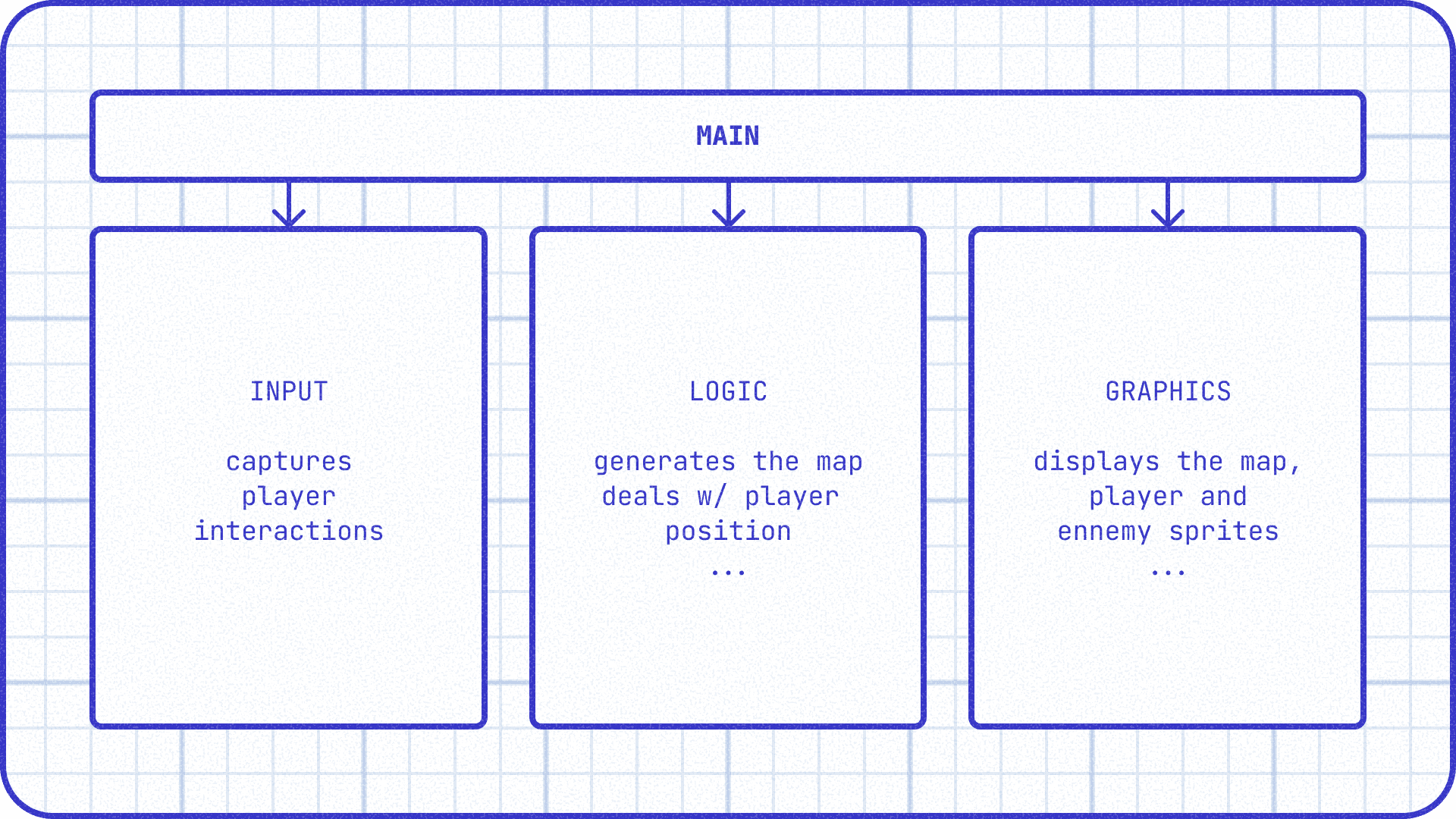
Luckily for me, we had completely decoupled the responsibilities of Kallune's graphics block, input block, and logic block. Since the graphics block relied on (incompatible with the DS) and the input block on (also incompatible), they had to be adapted. On the other hand, the entire game logic remained exactly the same (except for optimizations).
To learn more about how Kallune works
What does it look like to code a game without an engine? Last year, as part of an OpenGL course, my friends and I had to create a game from the ground up. Together, we debated the architect... Read more
After a quick setup of an empty project thanks to Patater's guide (very well done but a bit dated), and a few copy-pastes later, the project was finally running! See for yourself:
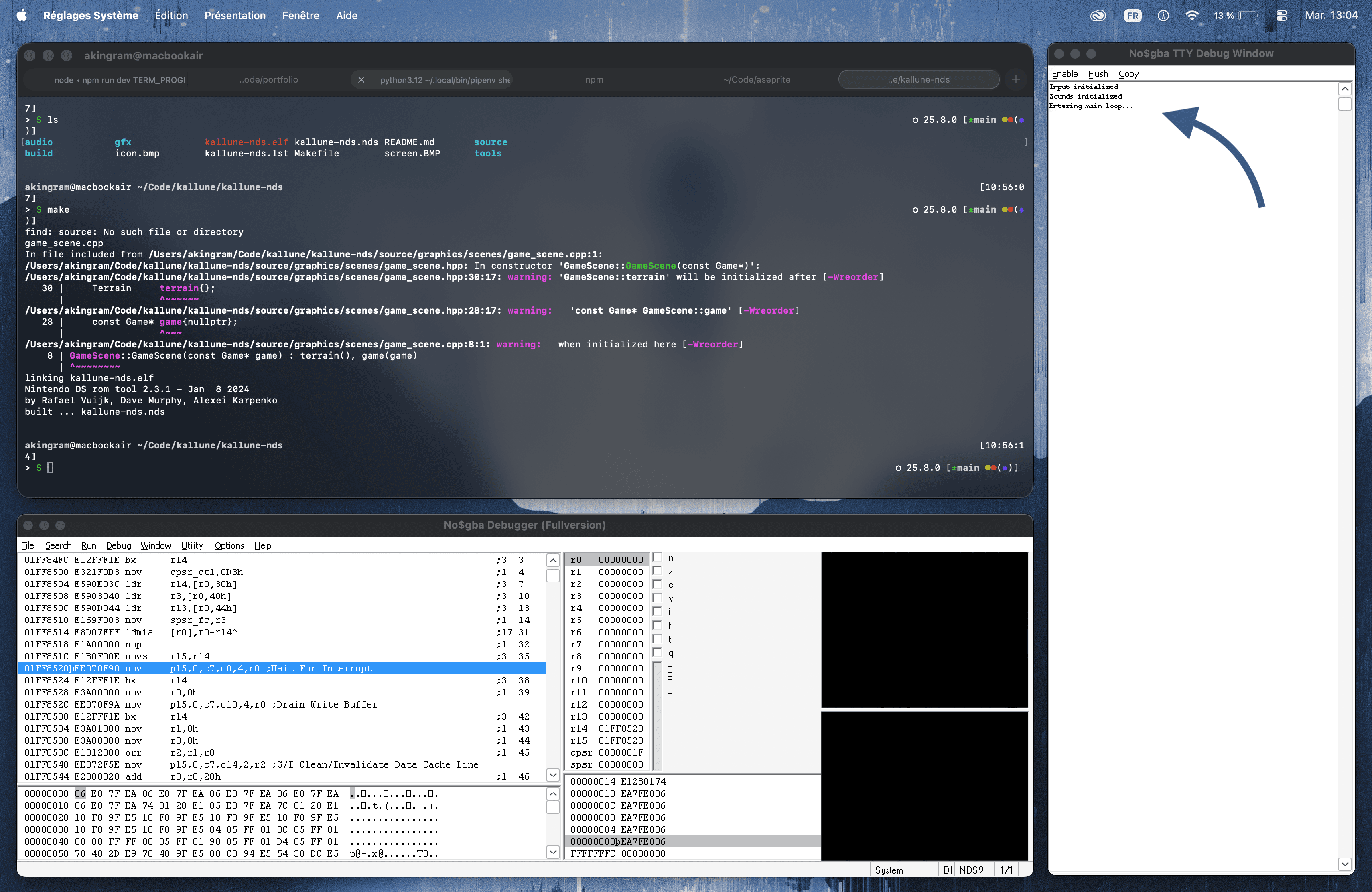
Not much to look at, sure, but if you look at the right, the game is showing signs of life in the console! What we see here is the no$gba interface: the grandpa of DS emulators, born back in the GBA era. It's not the most efficient, but it certainly has the best development tools. As you'll see later, its console, VRAM visualization tools, and CPU monitor would prove to be very useful.
The longest journey begins with a single step
To start, I wanted to display all the screens (statically, without real interaction) and be able to navigate between them (also a good opportunity to see how to display things on the screen). I'll gloss over this quickly, but in reality, it was quite laborious to adapt all the menus and buttons. The golden rule: 1 pixel of the asset = 1 pixel of the screen, otherwise the DS performs interpolation and you end up with blurry text.
And the trouble doesn't stop there. Once adapted to the screen, images also have to be adapted to the DS's technical capabilities. That's where , the asset transformer, comes in. Basically, it does two things:
-
BGR555 Compression: we lose a bit of nuance (going from 16 million to 32,768 colors).
-
Reformating: it can slice images into 8x8 tiles; otherwise, the DS hardware can't digest them.
The good news is that I don't have to do this conversion by hand every time I modify an asset. I integrated GRIT directly into the project's Makefile so it converts changed assets during compilation.
Minimap Objective
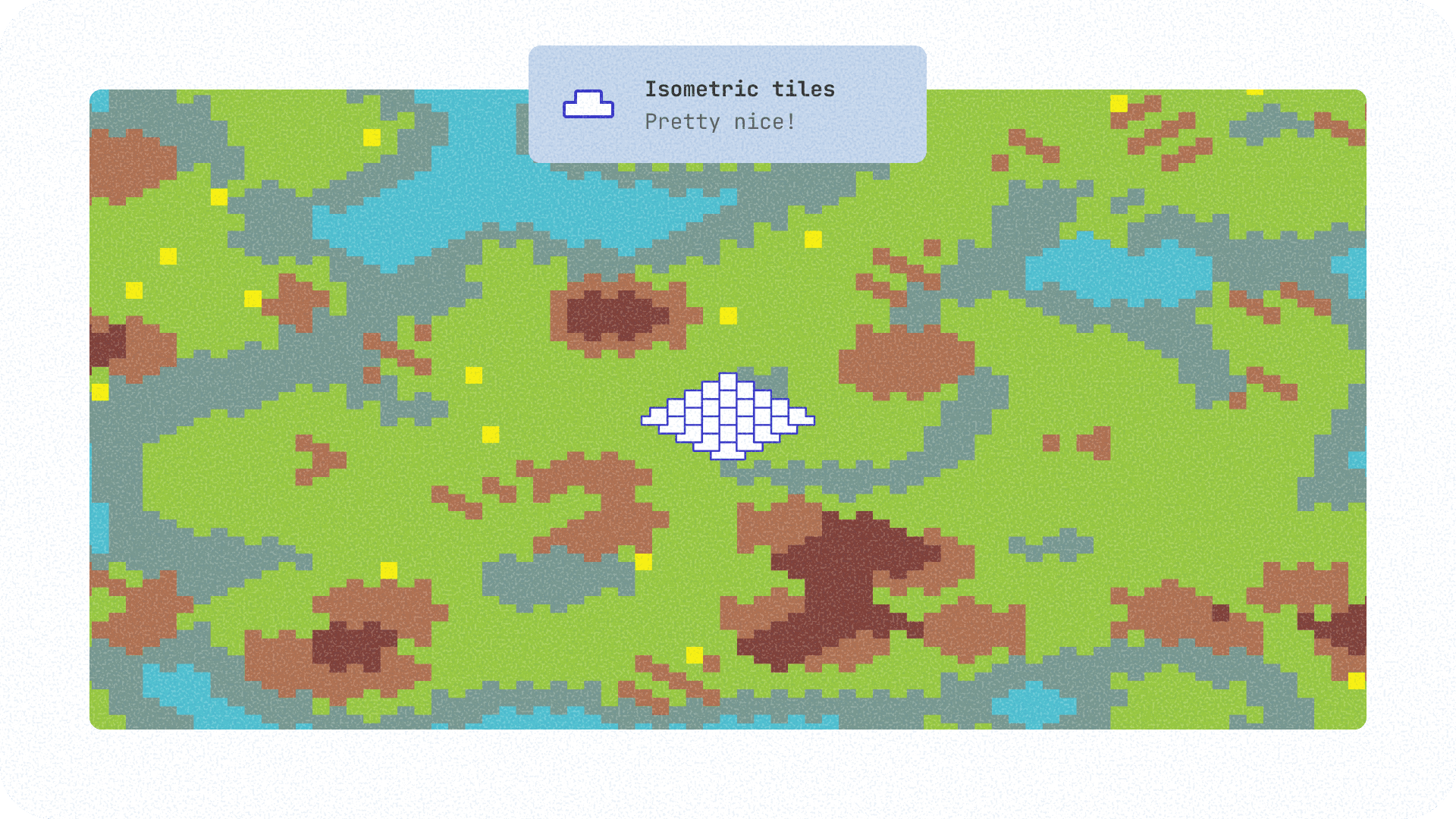
For the minimap display, I noticed two interesting things. First, I fumbled a bit before finding the right tile shape to represent my isometric map with so few pixels.
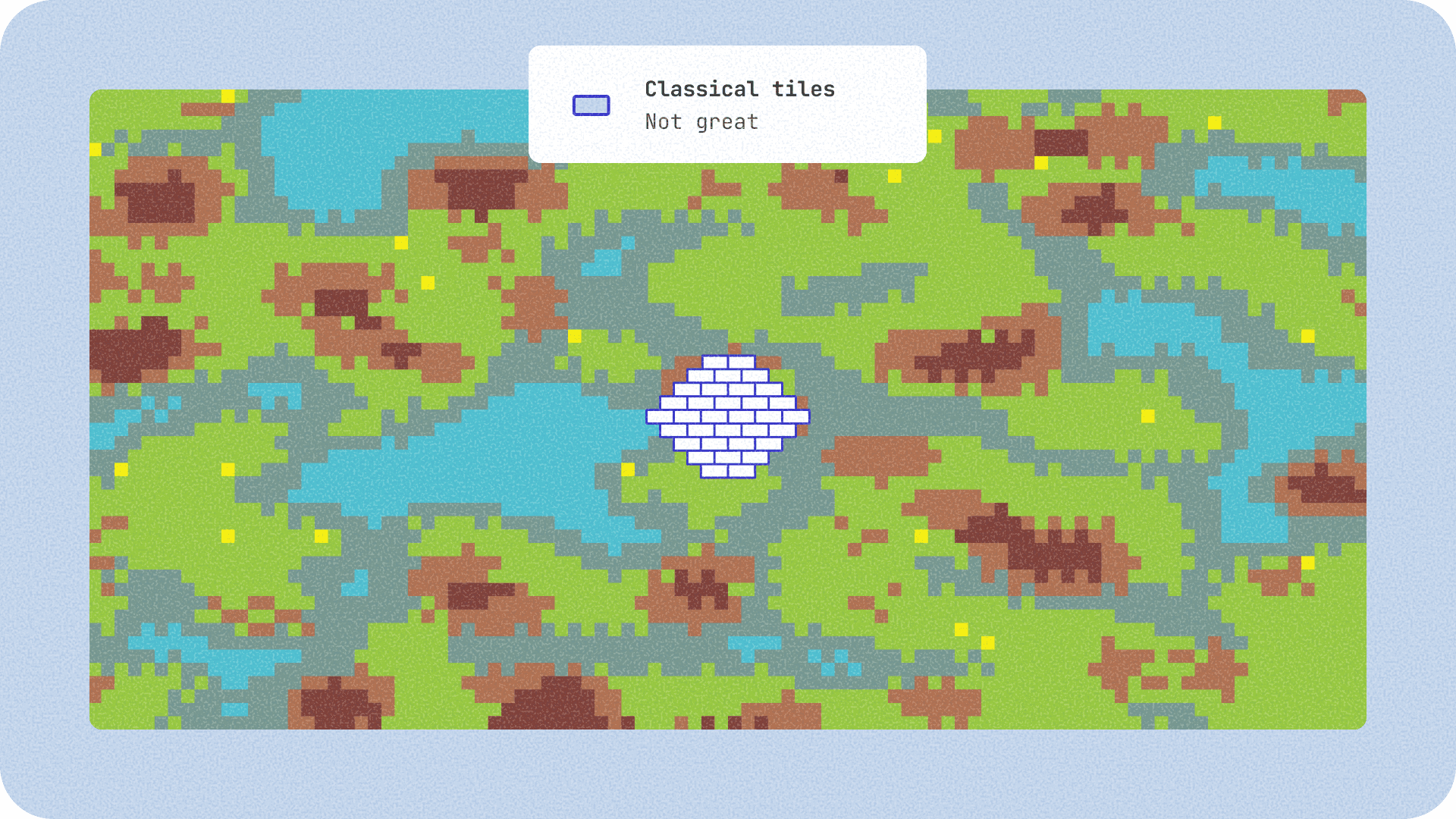
At first, I thought making 2-pixel tiles and alternating them would be enough. Unfortunately, that posed two problems:
- Unsuitable shape: the final shape created by this pattern is a diamond of equal width and height. However, I needed a "squashed" diamond, like my isometric tiles, to stay true to my map (meaning the width should be twice the height).
- Second problem: it looks bad (it creates a pixel soup effect).
In the end, I opted for slightly larger tiles that give the correct result and have a smoother rendering. This tile system relies on the fact that the bottom tiles are drawn after the background tiles, and therefore overlap them (see diagram above). Once this system was in place, I managed to get something quite visually convincing.
Houston, we have a (CPU) problem
The only problem: displaying the minimap consumed 70% of the available CPU budget every frame. 70% is huge and totally unsustainable. It only leaves 30% for sprites, the actual map, game logic, etc. Luckily for us, sounds are processed on a second CPU (the one used for GBA backward compatibility, for the curious), so we don't need to worry about that. For once, the DS's weird architecture plays in our favor, but still, 70% is way too much.
By digging a little, I quickly understood that redrawing the entire minimap every frame was too heavy. And yet, it was impossible to draw it only once because it's larger than the screen, so it needs to be repositioned according to the player's position. The solution: use a buffer in memory. Instead of recalculating every pixel of the scenery every frame, I generate the minimap background once and for all in a RAM buffer. With each refresh, I dump this data block to the VRAM, which costs almost zero CPU (it's always the same memory vs. calculation dilemma). Most importantly, it gives the CPU some breathing room to display the actual game.
To stop flying blind, I set up a performance counter. The goal was to allow me to compare the impact of my changes before and after.
A quick note on the DS framerate:
Basically, the console does its "sauce" (all the calculations needed for the frame), then waits for the next frame. By default, it targets 60 fps, so if we want the game to be fluid, that processing must take less than 16.6 ms (= 1s / 60). If we exceed this delay, we miss the window and the framerate drops directly to 30 fps because we wait for two frames (logic).
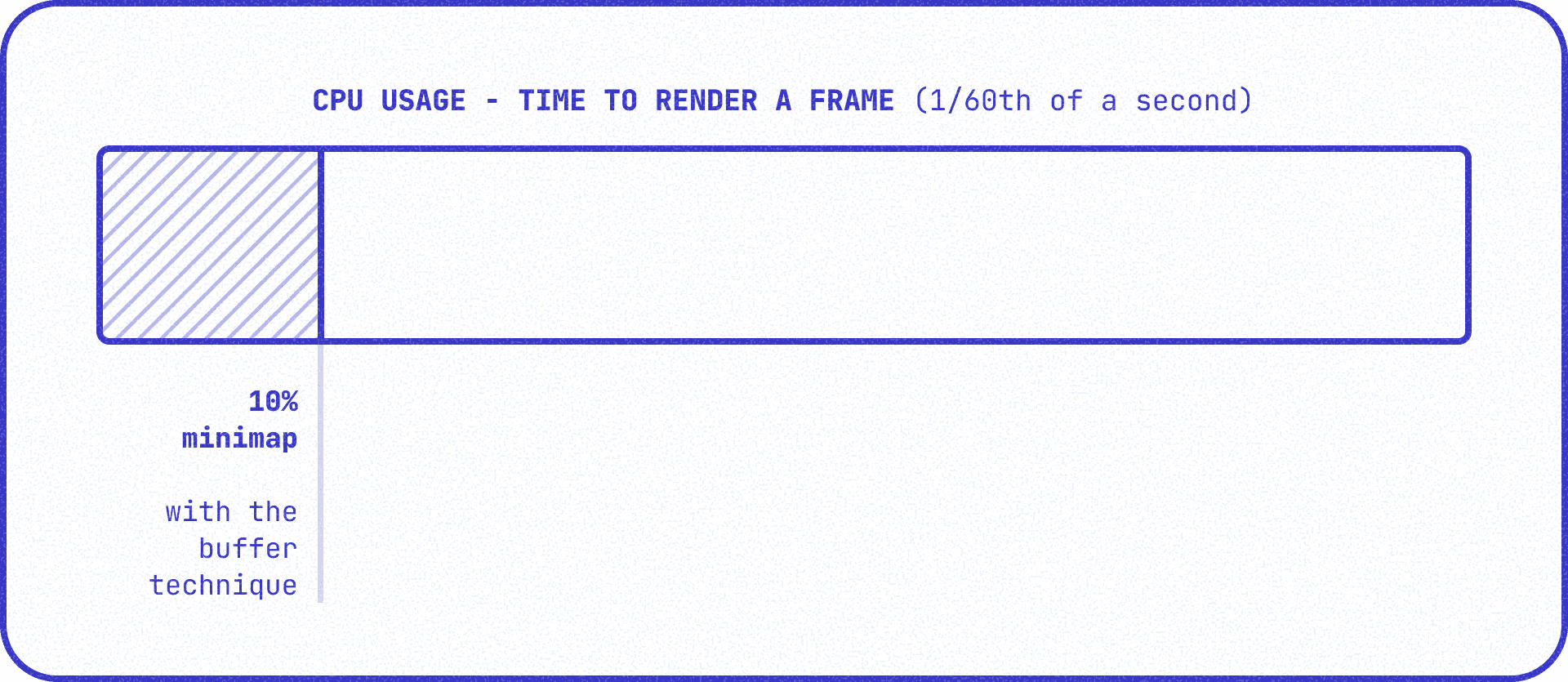
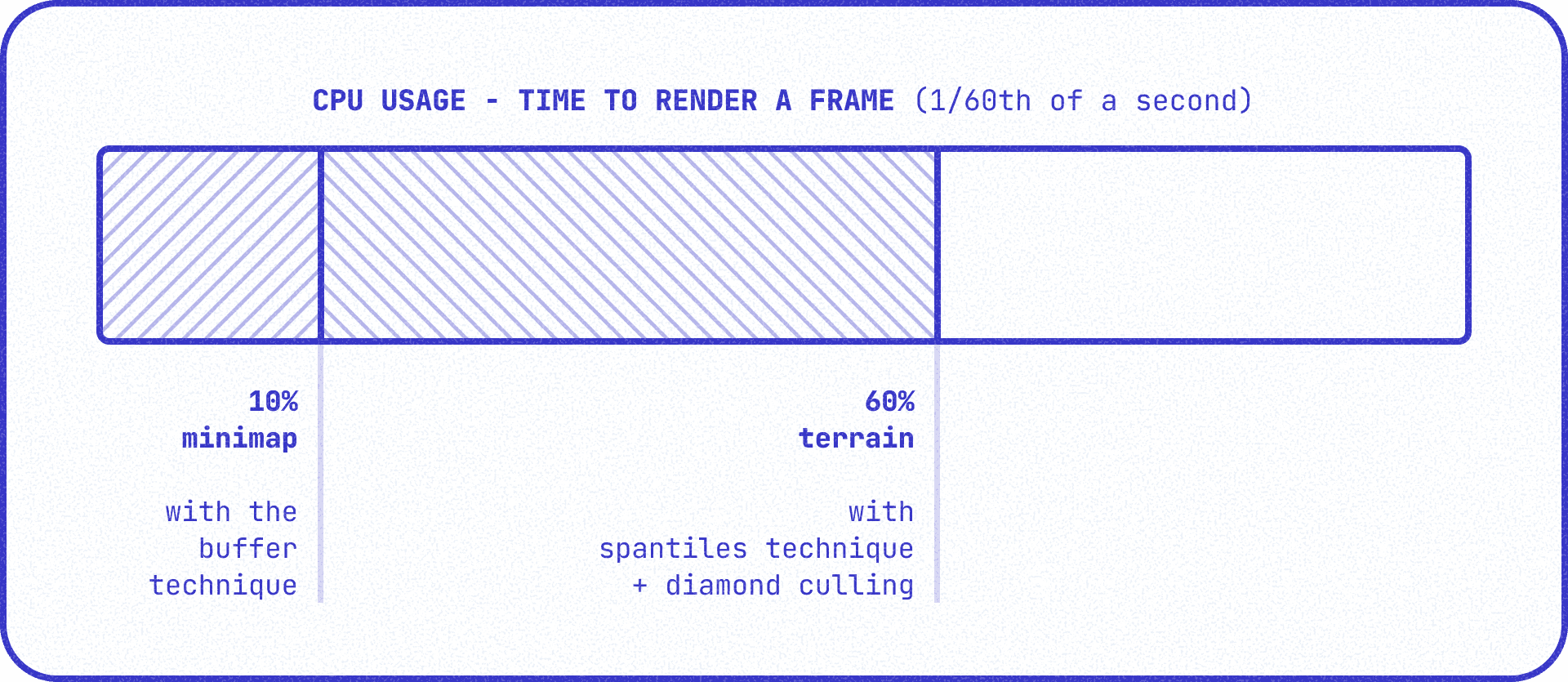
At this stage of development, we have a CPU usage of 10% per frame (due to the minimap), which is 1.66 ms. That leaves us 15 ms for the rest.
But tell me, don't you use a delta like any decent developer?
Not really. It's true, in a normal game, we compensate for framerate variations by multiplying movements by the time elapsed between two frames. This prevents the game from going super fast on a NASA computer or, conversely, lagging on an older PC.
But on the DS, from what I've understood, it's not the norm to do that.
In the end, I find it quite logical.
- First, everyone has the same hardware, so there's no performance difference.
- Second, if we had to multiply all our values by a delta, the poor DS CPU would quickly run out of steam. Not to mention it's not great with floats, so you have to use integers, which complicates things further.
Map Generation
From the start, the game would launch with ten seconds of a blank screen. At first, I thought this was normal and didn't question it. I felt even stupider when I realized it was actually the map, generated by cellular automata, being calculated before the title screen in blocking mode. While it took a hundredth of a second on the PC version, here the poor DS processor was chugging along for an eternity before it could display anything.
So I moved the generation to the start of a game and added a clean loading screen to keep the player waiting. The game now starts instantly. I think there are probably still some floats (very costly for the DS) hidden in there, but I haven't had time to look into it. I did notice that by placing the generation in ITCM (the DS's ultra-fast memory zone), we gain a bit of speed.
Since I was on a roll with map generation, I took the opportunity to add a feature that had been in my head since the original version of the game: map options. The cellular automata we coded to generate the map is modular, and it's a bit of a shame not to use it. So I added options in the menu allowing you to adjust the water level, map size, and enemy hostility (useful for testing). Are we looking at the Kallune Definitive Edition™️?
Stealing a technique from Doom
Displaying the minimap was easy; displaying the game environment is a different story.
First, it's impossible to reuse the buffer technique I used for the minimap. Since the DS is very good at scrolling within a pre-filled buffer and the map changes very little, you might think we could store the entire environment in a VRAM buffer. Yes, but... the problem is that for a map of 128x128 tiles, that's already 16,384 tiles. Each tile is 32x16px, so that's 8,388,608 pixels to fit into the poor VRAM.
| Format | Calculation | Total Weight |
|---|---|---|
| 8-bit (256 colors) | 8,388,608 x 1 byte | 8 MB |
| 16-bit (I don't know how many colors) | 8,388,608 x 2 bytes | 16 MB |
Except the DS only has 656KB of VRAM! It's therefore impossible to use this technique. Once again, we are faced with the CPU vs. RAM dilemma. Since we can't store what we want to display, we'll have to calculate it (at least in part).
For games like Zelda, the DS has a super-fast hardware-accelerated grid background system. But this system is limited to square 8x8 pixel tiles and doesn't allow tiles to overlap => totally incompatible with our isometric map.
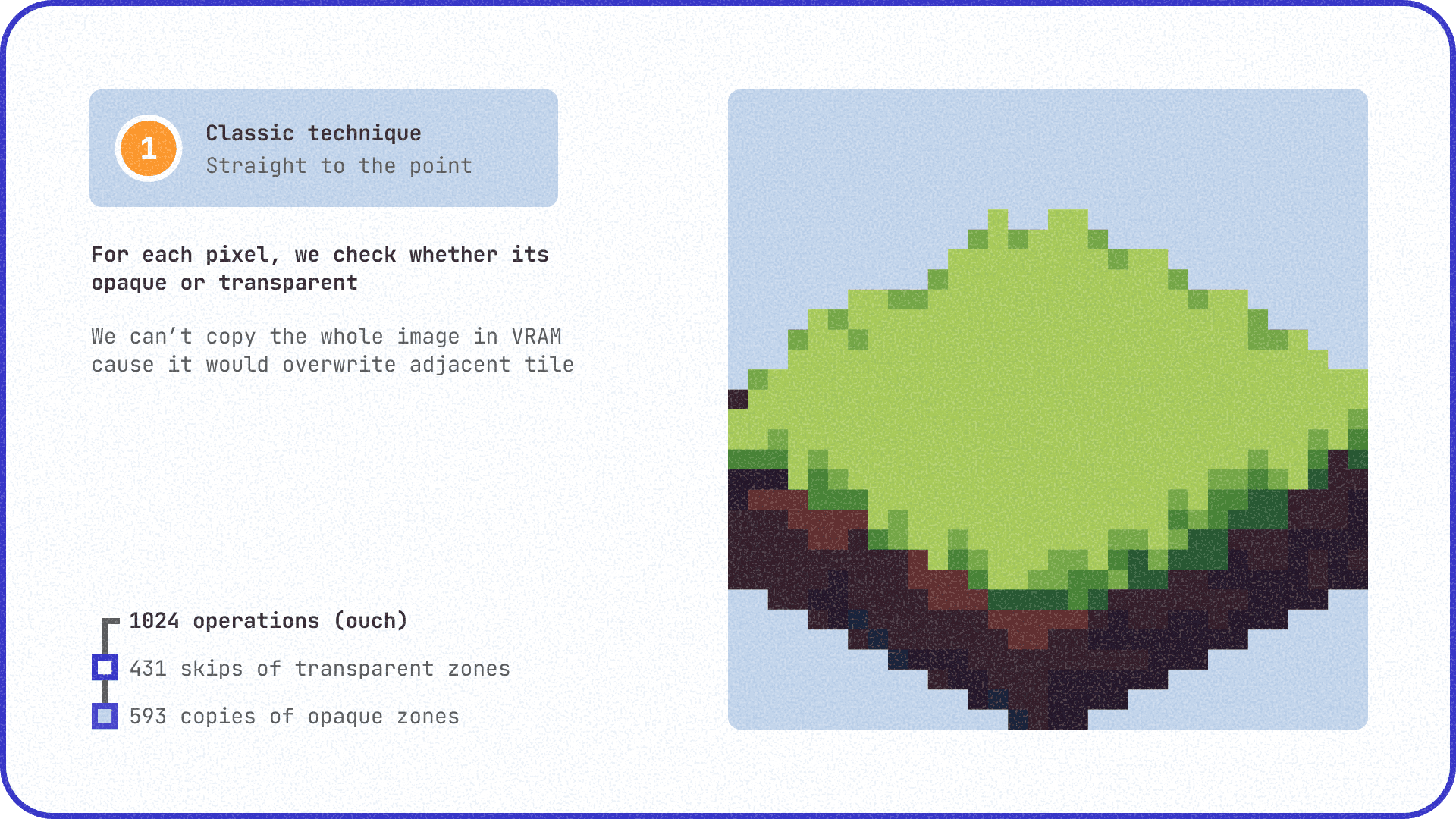
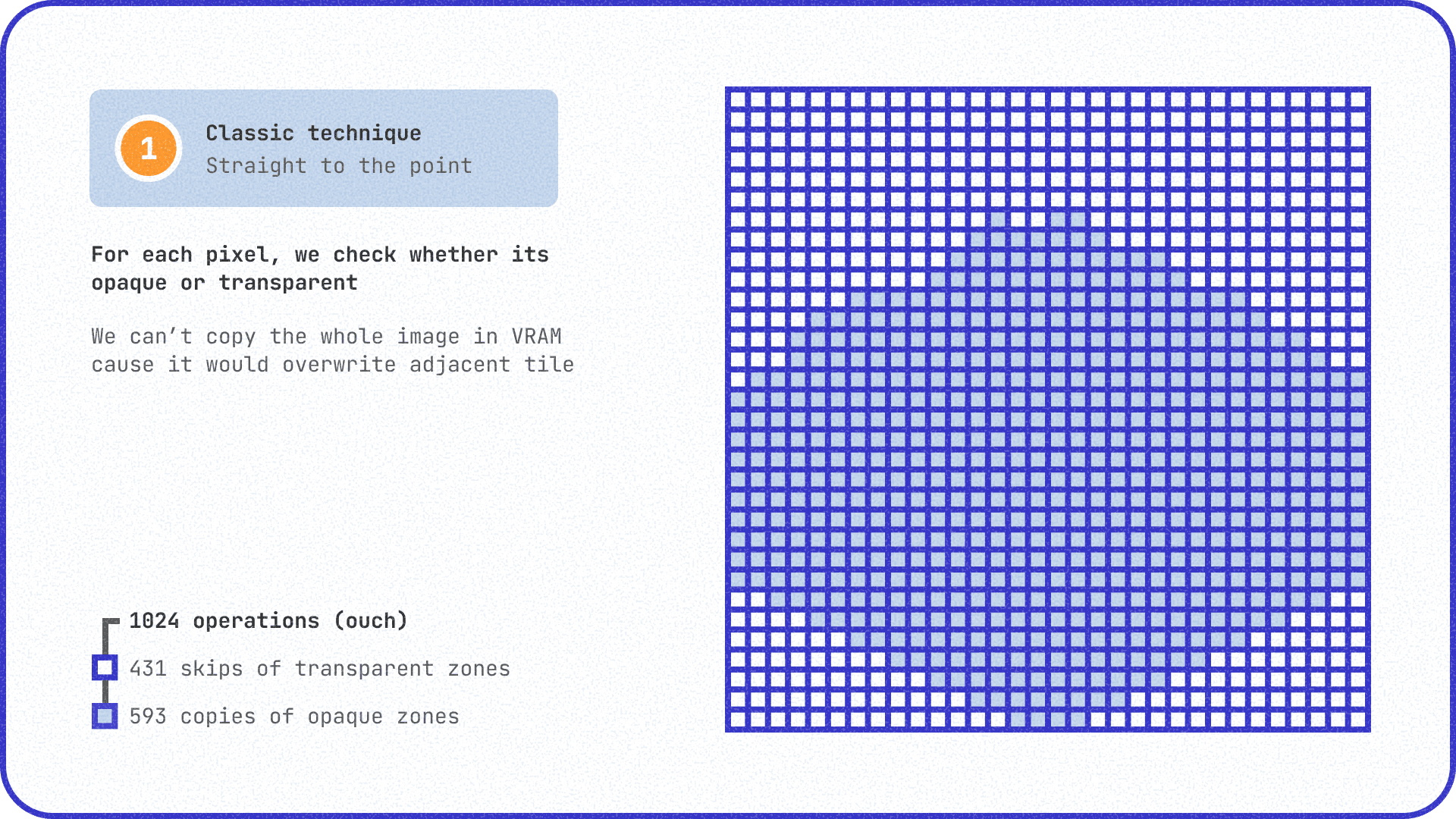
So here's the first lead I explored: I allocate a buffer the size of the screen (192x256 px or 98.3 KB of VRAM). This buffer is displayed directly on the screen; everything written inside is visible.
However, to ensure visual transparency around the tiles, every pixel on the screen must be checked via software to know if it's kept (opaque) or ignored (otherwise you blindly overwrite bits of tiles already copied with black pixels). It's extremely costly! I tested it, and putting the small DS CPU to work checking and then copying each opaque pixel one after the other smashed all records with about 230% of the CPU budget consumed.
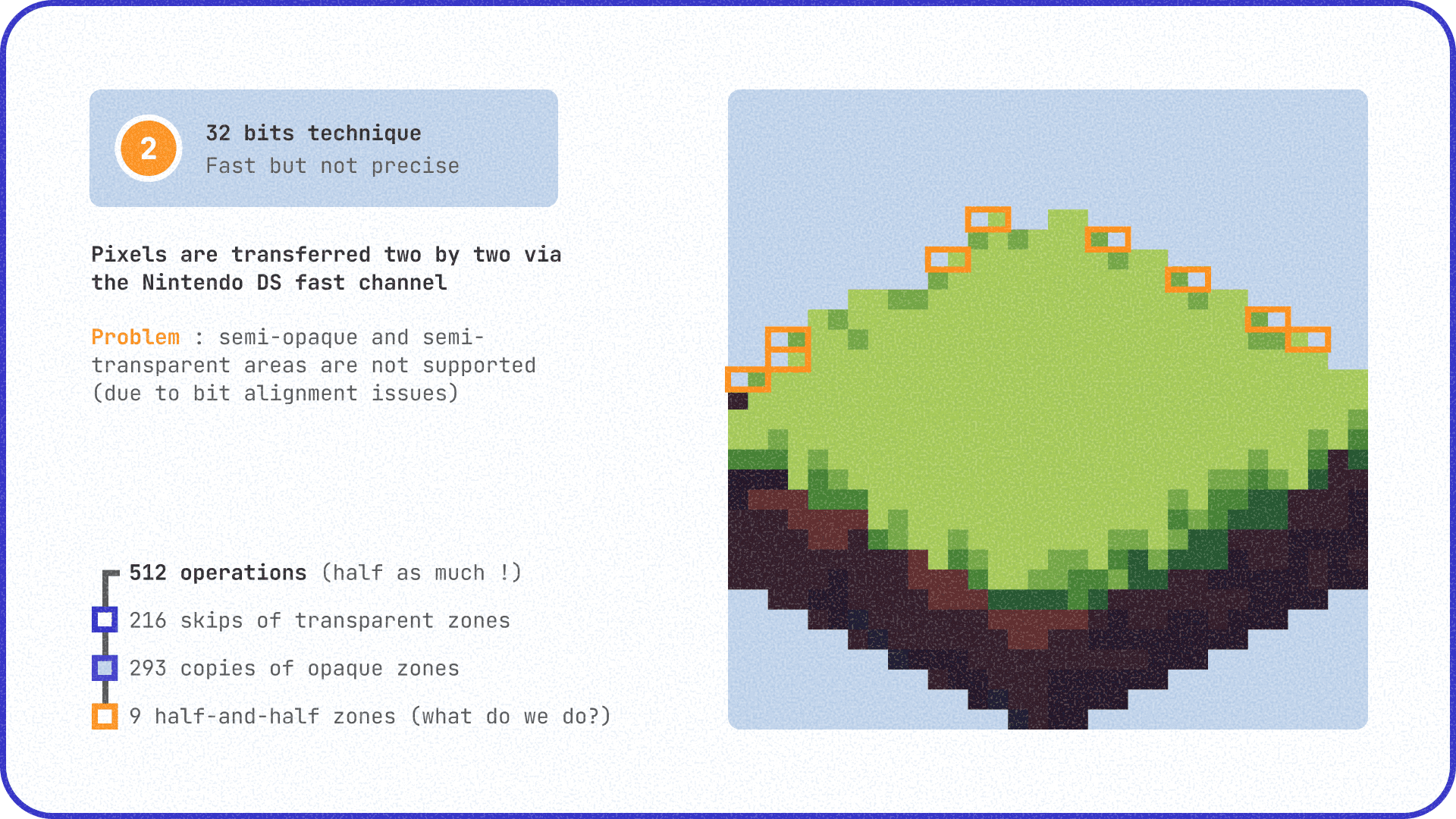
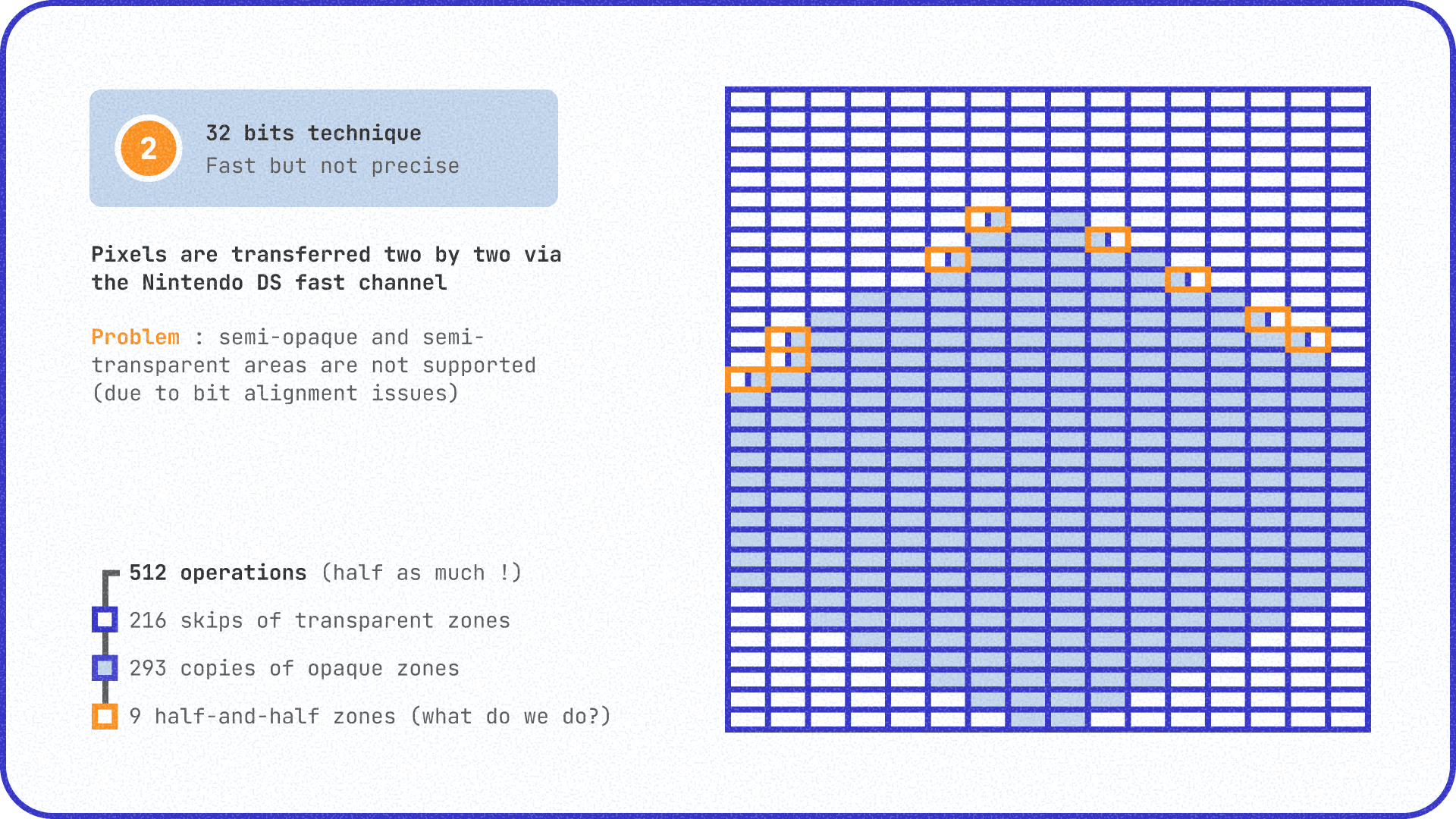
Second attempt. After some research, I discovered that the DS has a hyper-fast channel for transferring data: the DMA. With it, you can copy 32 bits in parallel, or 2 pixels at a time. By using it, we perform half as many operations, which halves the time to copy a tile.
It's better... but far from enough. According to my measurements, we're still at 124% of the CPU budget consumed.
And more importantly, we've introduced a new problem. What do we do if, within the 2-pixel block we want to transfer, one is opaque and the other is transparent? These are the famous orange zones in the diagram above. If we check every pixel to decide whether to transfer or not, it costs us precious extra CPU cycles. There's really no good solution for this problem.
Unless...
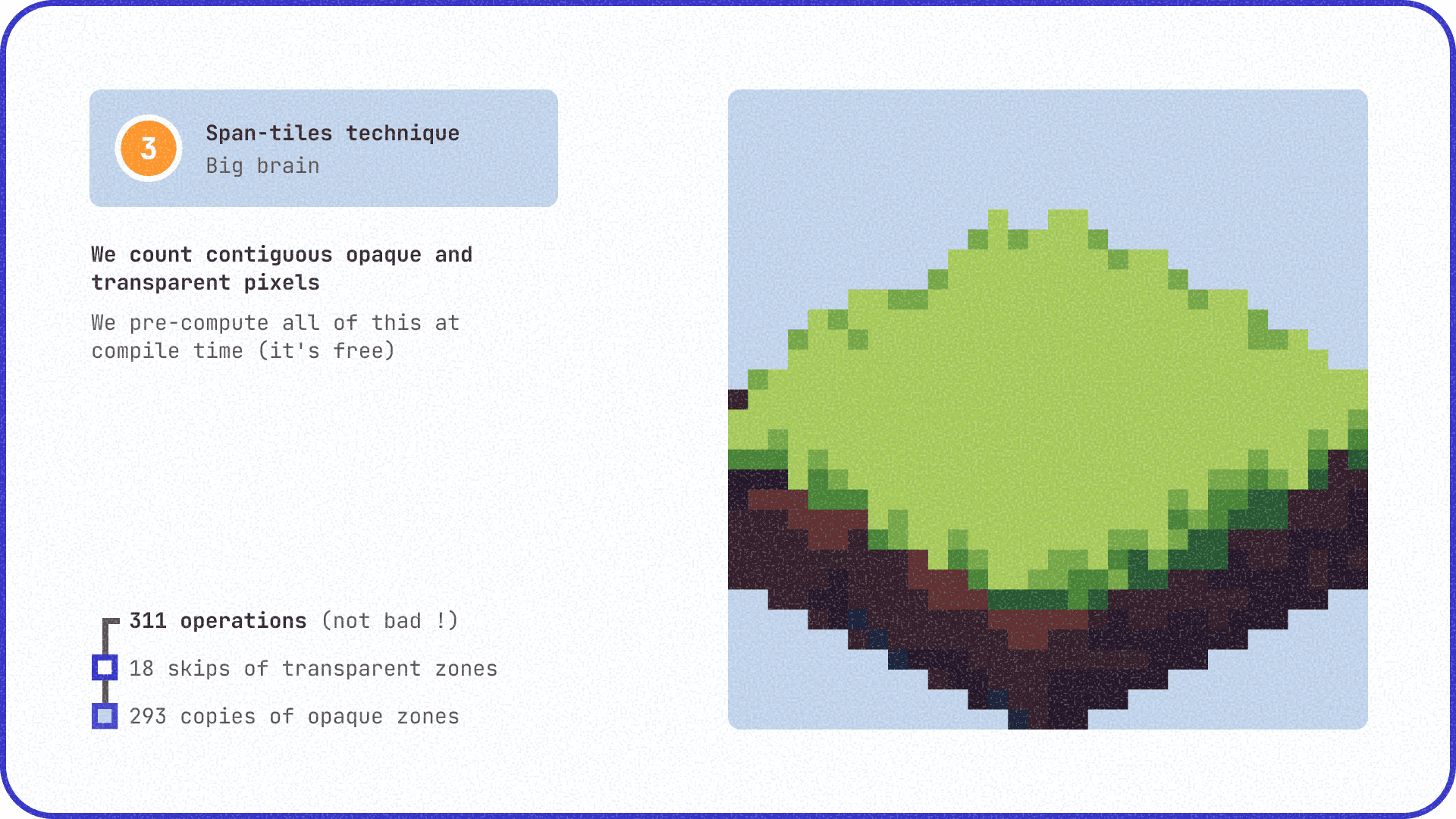
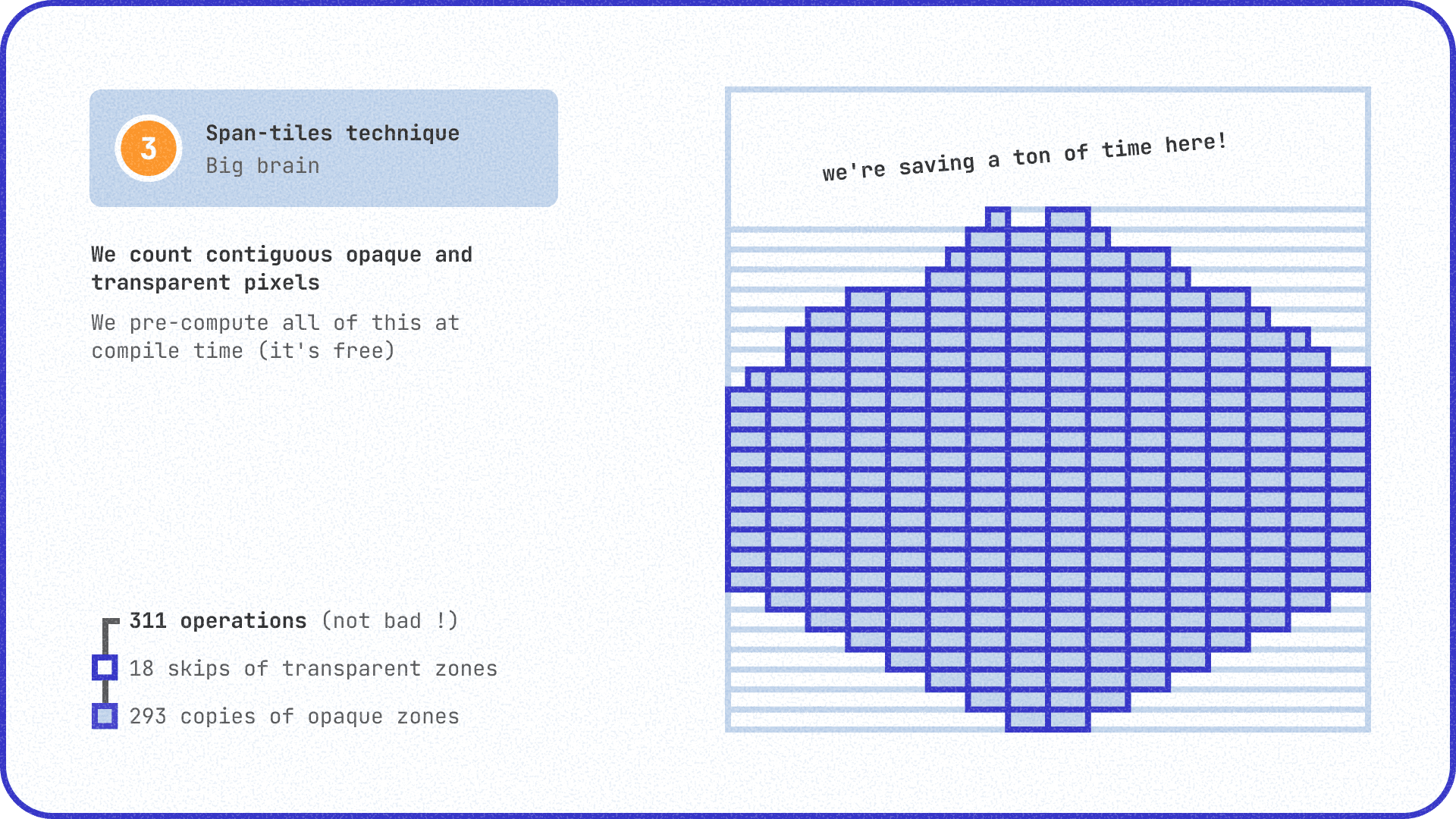
This is where span-tiles enter the picture. The idea is simple but devilishly effective: at the time of compiling the program (on my PC, that is), I count the transparent pixels that are touching each other and store them in a .h file. When displaying a tile, the Nintendo DS simply reads the corresponding spans and jumps directly to the opaque pixels without having to test them one by one. This idea isn't new; it was already used in Doom in 1993 (another John Carmack move).
const uint16_t tile001_spans[] = {
  11, 4,  // Skip 11 pixels, draw 4
  22, 8,  // Skip 22 pixels, draw 8
  // ... etc
};
I took the opportunity to integrate this into the build pipeline. I made a script that generates a .h file for each .span.png image and includes it in the program. This script is called automatically by the Makefile, so every time I modify a .span.png image, the .h file is regenerated automatically.
Not bad! We're down to 93% CPU, minimap included.
To push the optimization a bit further, I tried to implement a rolling buffer. The idea is simple: instead of redrawing the entire map with every movement, we use a buffer slightly larger than the screen. Only the new rows or columns entering the screen are calculated; the rest of the time, we just scroll. And since the DS is great at scrolling within a buffer, it costs almost nothing. I tested this technique, but it's still on a branch because the integration introduced bugs, and the gains aren't that huge (I won't dwell on it).
Out of sight, out of mind
Let's not get carried away too quickly. Before optimizing the display of individual tiles, maybe we could display fewer tiles altogether? This is called culling: everything that isn't on the screen is purely and simply ignored by the game code. I had implemented a sort of culling early in the project, but it was a bit inefficient.
The natural idea is to take our loop that iterates through the entire tile grid and add a if (!tile.is_visible) -> skip.
Sure, why not, but we can do better. First, why iterate through the entire grid (which could be very large)? With a CPU like the DS's, every little saving counts.
It's better to start from the player's position and loop around it to grab all the adjacent tiles.
//pseudo-code
for (int x = player.pos.x - 5; x < player.pos.x + 5; x++) {
  for (int y = player.pos.y - 5; x < player.pos.y + 5; y++) {
Not bad! We avoid a lot of if statements. The problem... is that we're drawing a square around the player. A square is fine, but we're in an isometric view. So on the screen, it appears as a diamond!
Ideally, our loop should select a diamond in the 2D grid so that in isometric view, it forms a square. And a square is great because it fills the screen without overflowing. That way, we don't waste a single crumb of CPU power. After a lot of trial and error and scribbling on paper, I found something that works pretty well.
See for yourself (I intentionally set the culling a bit too short so you can clearly see its square shape).
With all that, we're down to 60% CPU.
What's next?
I've skipped over plenty of optimizations: tricks to avoid divisions (which the DS CPU hates), ways to calculate adjacent tiles only once, etc.
It's great; we now have plenty of CPU budget left over. Except the sprites are still missing! Without the badger, it feels a bit empty, right?
And that's a whole other ball game that's likely to take quite a while. So, since I fully intend to write a follow-up to this article, I'll see you next time!